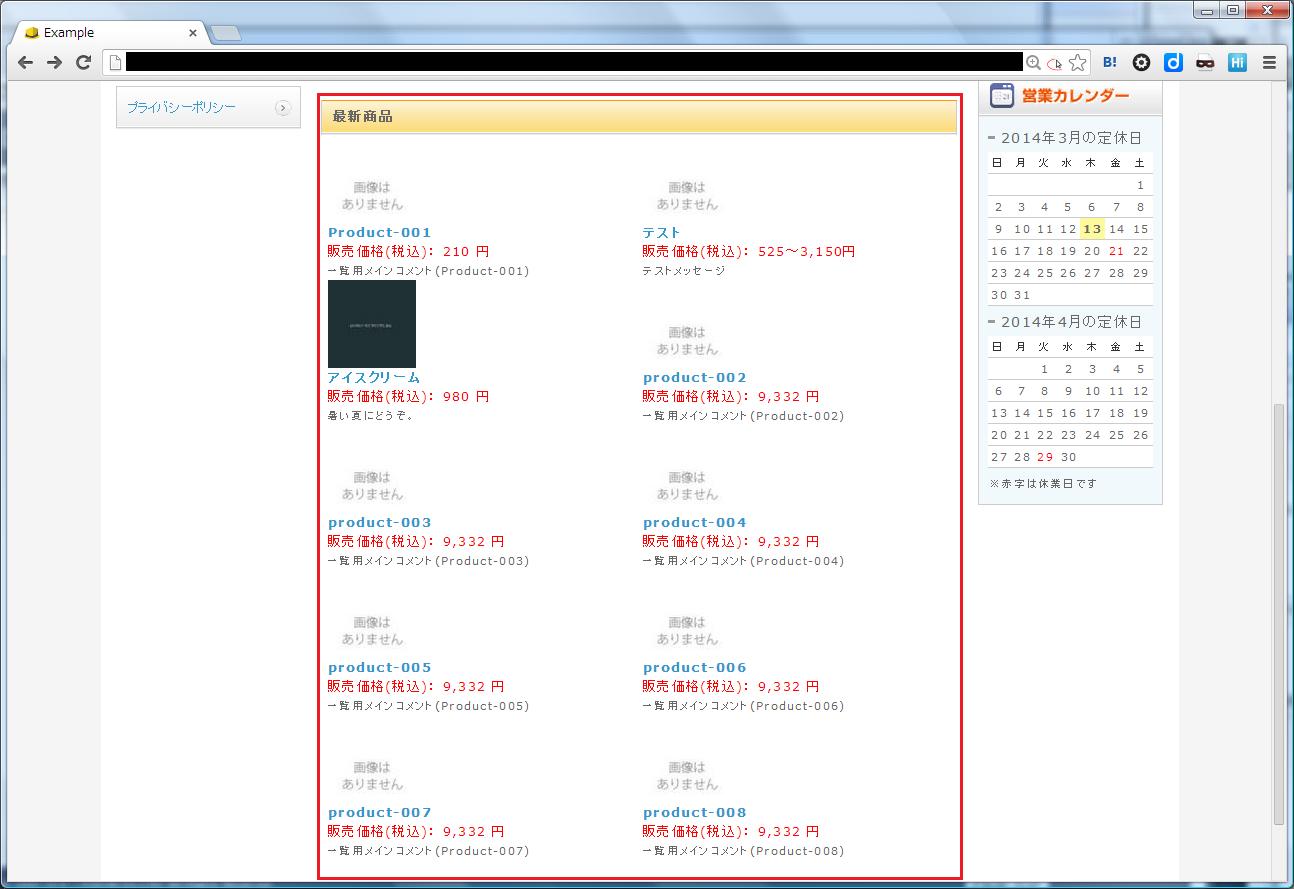
■最新商品を表示するブロックを作成する
TOPページとかに最新の商品を表示するためのブロックを設置する
最新商品はNEWアイコンがチェックされているものを対象とする
手順:
管理画面のブロック設定から最新商品を表示するnew_products.tplを作成する
new_products.phpファイルを作成する
LC_Page_FrontParts_Bloc_New_Products_Ex.phpを作成する
LC_Page_FrontParts_Bloc_New_Products.phpを作成する
データベースを修正する
■管理画面のブロック設定から最新商品を表示するnew_products.tplを作成する
<!--{if count($arrProducts) > 0}-->
<div class="bloc_outer clearfix">
<div id="recommend_area">
<h2>最新商品</h2>
<div class="bloc_body clearfix">
<!--{section name=cnt loop=$arrProducts}-->
<div class="product_item clearfix">
<div class="productImage">
<a href="<!--{$smarty.const.P_DETAIL_URLPATH}--><!--{$arrProducts[cnt].product_id|u}-->.php">
<img src="<!--{$smarty.const.ROOT_URLPATH}-->resize_image.php?image=<!--{$arrProducts[cnt].main_list_image|sfNoImageMainList|h}-->&width=80&height=80" alt="<!--{$arrProducts[cnt].name|h}-->">
</a>
</div>
<div class="productContents">
<h3>
<a href="<!--{$smarty.const.P_DETAIL_URLPATH}--><!--{$arrProducts[cnt].product_id|u}-->.php"><!--{$arrProducts[cnt].name|h}--></a>
</h3>
<p class="sale_price"><!--{$smarty.const.SALE_PRICE_TITLE}-->(税込):
<!--{if $arrProducts[cnt].price02_min_inctax == $arrProducts[cnt].price02_max_inctax}-->
<span class="price"><!--{$arrProducts[cnt].price02_min_inctax|number_format}--> 円</span>
<!--{else}-->
<span class="price"><!--{$arrProducts[cnt].price02_min_inctax|number_format}-->~<!--{$arrProducts[cnt].price02_max_inctax|number_format}-->円</span>
<!--{/if}-->
</p>
<p class="mini comment"><!--{$arrProducts[cnt].comment|h|nl2br}--></p>
</div>
</div>
<!--{/section}-->
</div>
</div>
</div>
<!--{/if}-->
■new_products.phpファイルを作成する
<?php
require_once realpath(dirname(__FILE__)) . '/../../require.php';
require_once CLASS_EX_REALDIR . 'page_extends/frontparts/bloc/LC_Page_FrontParts_Bloc_New_Products_Ex.php';

$objPage = new LC_Page_FrontParts_Bloc_New_Products_Ex();
$objPage->blocItems = $params['items'];
$objPage->init();
$objPage->process();
■LC_Page_FrontParts_Bloc_New_Products_Ex.phpを作成する
<?php
require_once CLASS_REALDIR . 'pages/frontparts/bloc/LC_Page_FrontParts_Bloc_New_Products.php';

/**
 * New_Products のページクラス(拡張).
 *
 * LC_Page_FrontParts_Bloc_New_Products をカスタマイズする場合はこのクラスを編集する.
 *
 * @package Page
 * @version $ $
 */
class LC_Page_FrontParts_Bloc_New_Products_Ex extends LC_Page_FrontParts_Bloc_New_Products
{
    /**
     * Page を初期化する.
     *
     * @return void
     */
    function init()
    {
        parent::init();
    }

    /**
     * Page のプロセス.
     *
     * @return void
     */
    function process()
    {
        parent::process();
    }

    /**
     * Page のアクション.
     *
     * @return void
     */
    public function action()
    {
        // 新着商品のステータスIDを設定(デフォルトでは NEW=1)
        $product_status_id = 1;
        //表示する商品の件数
        $limit = 10;

        // 新着商品取得
        $this->arrProducts = $this->getNewProducts($product_status_id, $limit);

        // 税別表示するはコメントアウトしてtplファイルを編集
        SC_Product_Ex::setIncTaxToProducts($this->arrProducts);
    }


    /**
     * 新着商品取得.
     *
     * @param int 新着商品のステータスID
     * @return array 新着商品配列
     */
    function getNewProducts($__product_status_id, $limit){
        $objQuery   =& SC_Query_Ex::getSingletonInstance();
        $col = <<< __EOS__
                p.product_id,
                p.name,
                p.main_list_image,
                p.main_list_comment AS comment,
                MIN(pc.price02) AS price02_min,
                MAX(pc.price02) AS price02_max
__EOS__;
        $from = <<< __EOS__
                dtb_products as p
           LEFT JOIN dtb_products_class as pc
             ON p.product_id = pc.product_id
           LEFT JOIN dtb_product_status as ps
             ON p.product_id = ps.product_id
__EOS__;
        $where = "p.del_flg = 0 AND p.status = 1 AND ps.product_status_id = ?";
        $groupby = "p.product_id, p.name, p.main_list_image, p.main_list_comment, ps.product_id, p.update_date";
        $objQuery->setGroupBy($groupby);
        $objQuery->setOrder('p.update_date DESC');
        $objQuery->setLimit($limit);

        return $objQuery->select($col, $from, $where, array($__product_status_id));
    }
}
表示件数やステータスIDはdefine.phpファイルで定義しておくと運用しやすくなるので余力があれば設定するとよい

定義例:

define('NEW_PRODUCTS_MAX', 10);  // 最新商品の表示数

define('PRODUCTS_STATUS_NEW', 1);        // 商品ステータス:NEW
define('PRODUCTS_STATUS_LOW', 2);        // 商品ステータス:残りわずか
define('PRODUCTS_STATUS_TWICE', 3);      // 商品ステータス:ポイント2倍
define('PRODUCTS_STATUS_RECOMMEND', 4);  // 商品ステータス:オススメ
define('PRODUCTS_STATUS_LIMIT', 5);      // 商品ステータス:限定品
■LC_Page_FrontParts_Bloc_New_Products.phpを作成する
<?php
require_once CLASS_EX_REALDIR . 'page_extends/frontparts/bloc/LC_Page_FrontParts_Bloc_Ex.php';

/**
 * New_Products のページクラス.
 *
 * @package Page
 * @author LOCKON CO.,LTD.
 * @version $ $
 */
class LC_Page_FrontParts_Bloc_New_Products extends LC_Page_FrontParts_Bloc_Ex
{
    /**
     * Page を初期化する.
     *
     * @return void
     */
    public function init()
    {
        parent::init();
    }

    /**
     * Page のプロセス.
     *
     * @return void
     */
    public function process()
    {
        $this->action();
        $this->sendResponse();
    }
}
■データベースを修正する(phpMyAdminを利用する場合)
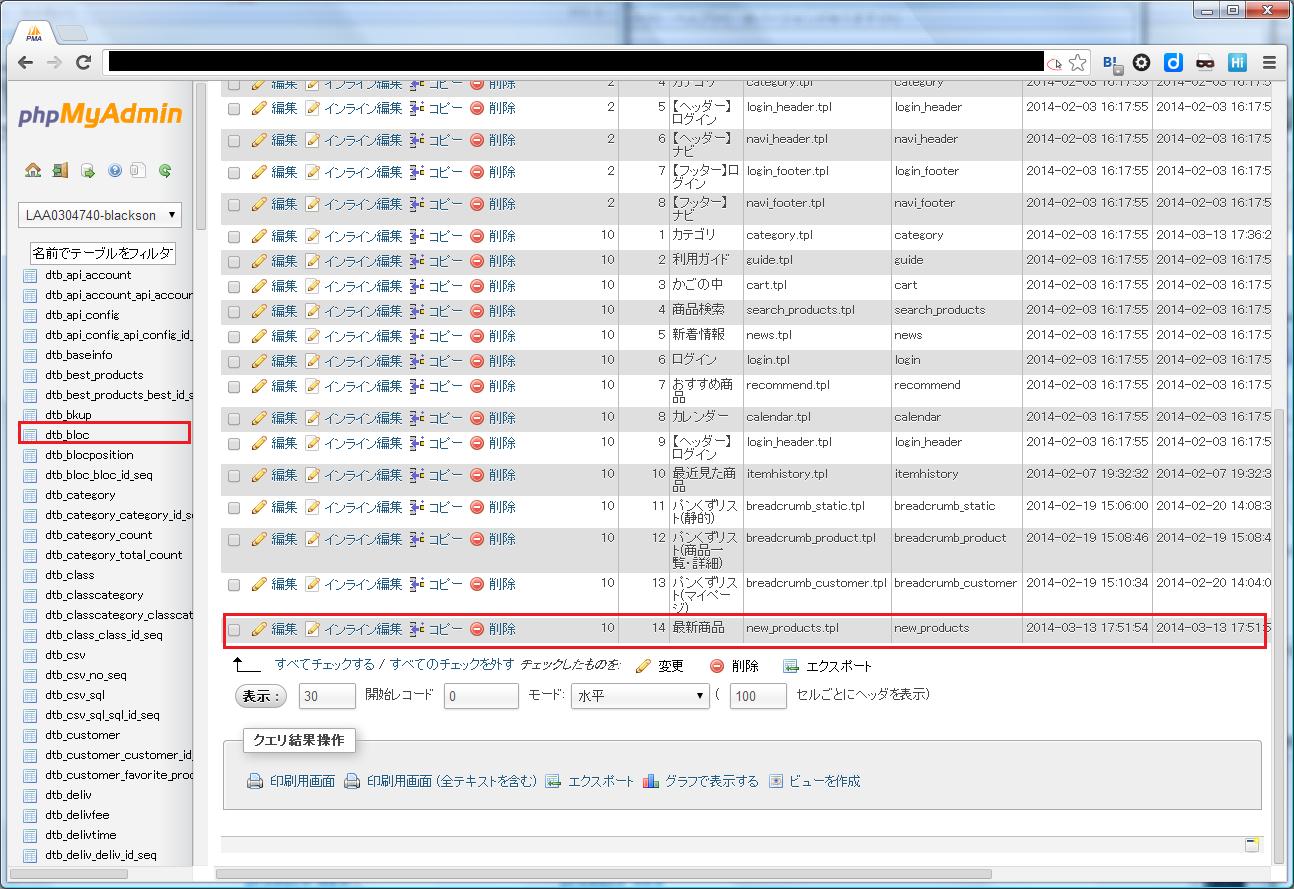
『phpMyAdmin』にログインして『dtb_bloc』をクリックする
block_nameが『最新商品』の行の『編集ボタンをクリック』
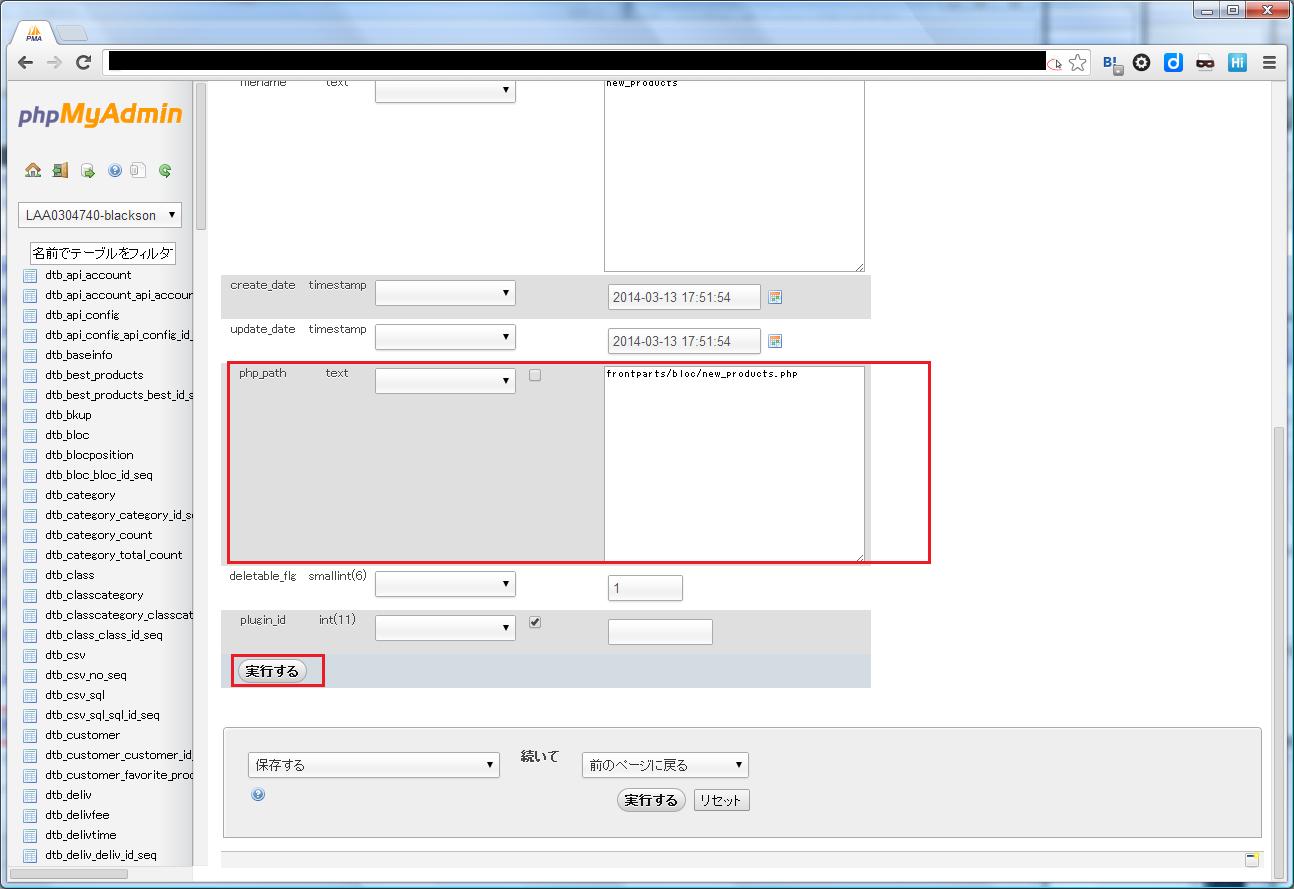
呼び出しファイルを設定する『php_path』に【frontparts/bloc/new_product.php】を設定する
『実行する』をクリックする
以上で全てのページに対して『最新商品』のブロックを表示することが出来る
■レイアウト設定から『最新商品』をTOPに適用
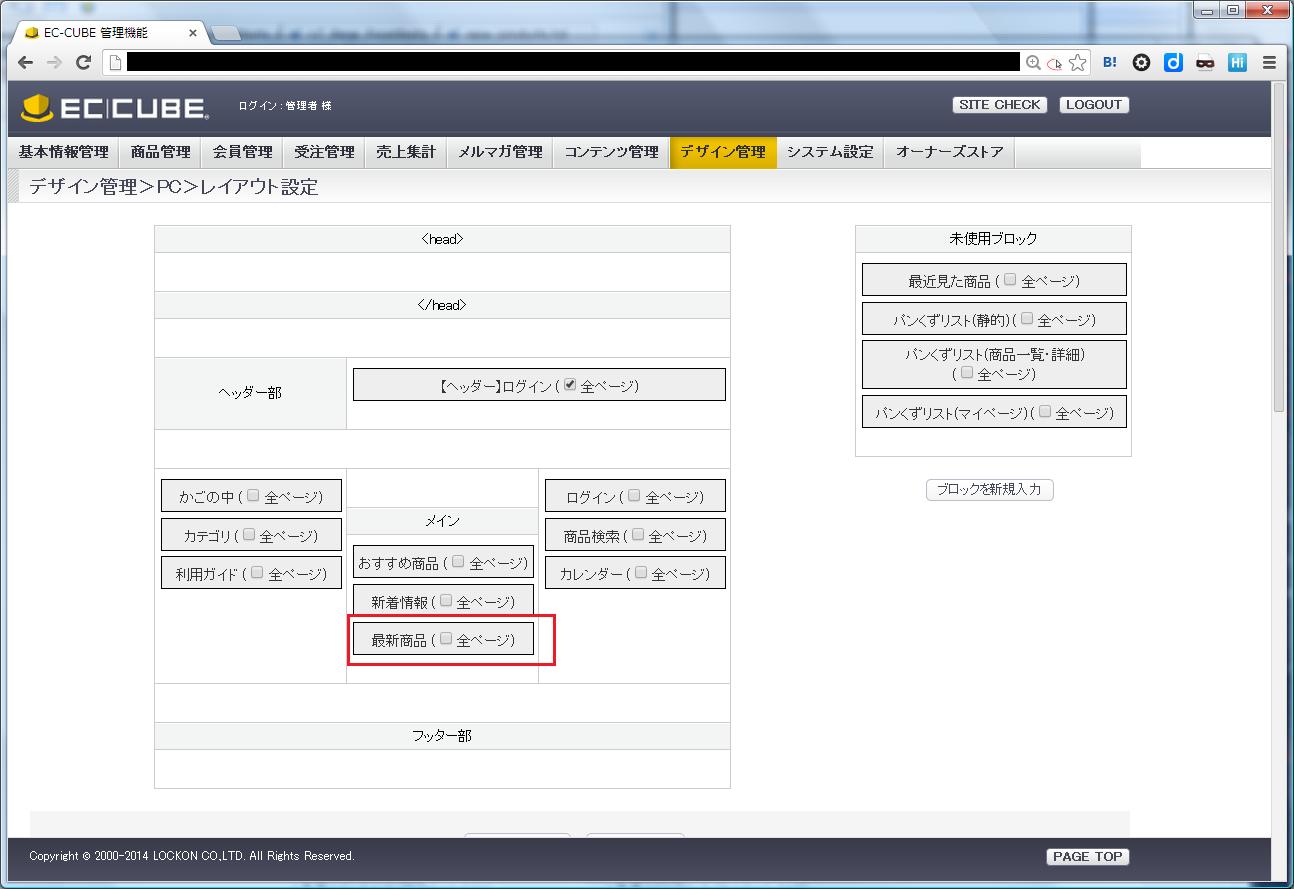
■適用後の画面(TOPページ)